
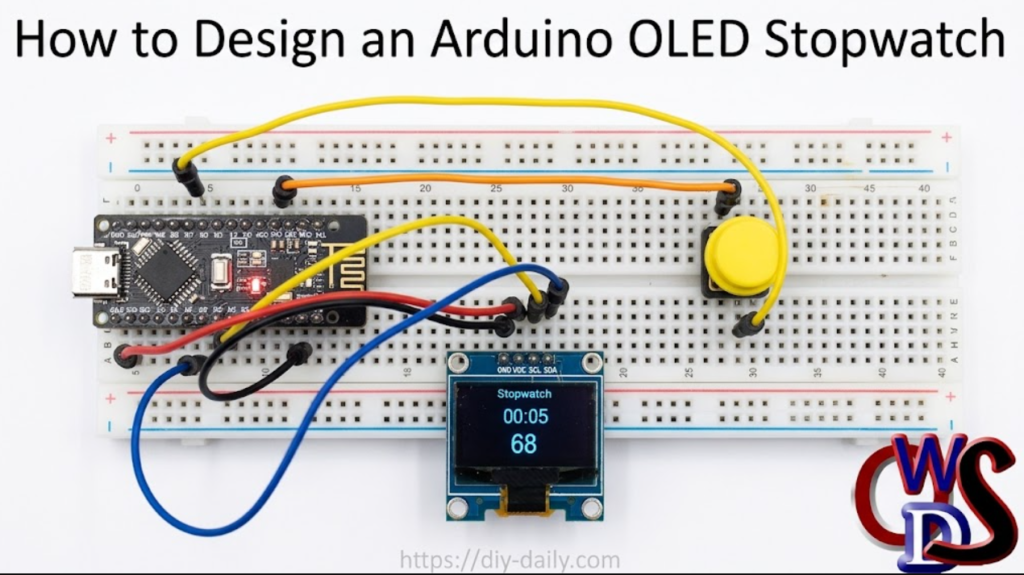
Materials Required
To build this stopwatch project, gather the following hardware components.
Some versions include an OLED display.
- Microcontroller: Arduino UNO, Nano, or Pro Mini (ATmega328P-based boards).
- Display: 0.96-inch I2C OLED Display (128×64 resolution, SSD1306 driver).
- Input: 2x Momentary Push Buttons (Tactile switches for Start/Stop and Reset).
- Breadboard: Standard half-size or full-size breadboard.
- Wiring: Jumper wires (Male-to-Male and Male-to-Female).
- Power: USB cable or external 5V power source for your Arduino.
Circuit Connections & Wiring Diagram
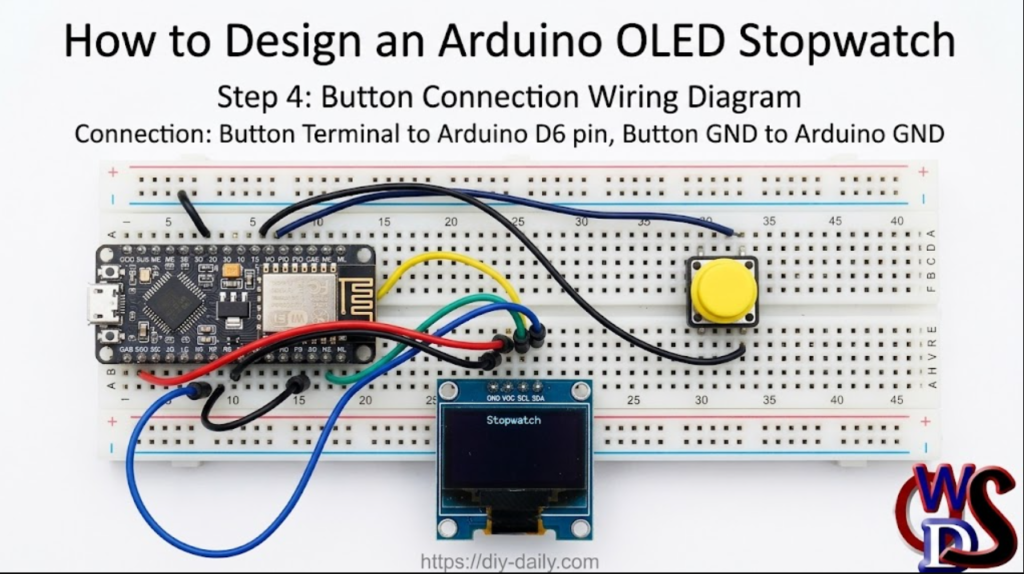
The 0.96-inch OLED display communicates via the I2C protocol, which uses only two data pins on the Arduino (SDA and SCL). The push buttons use digital input pins with internal pull-up resistors enabled in software, minimizing external wiring.
| Component | Component Pin | Arduino UNO/Nano Pin | Description |
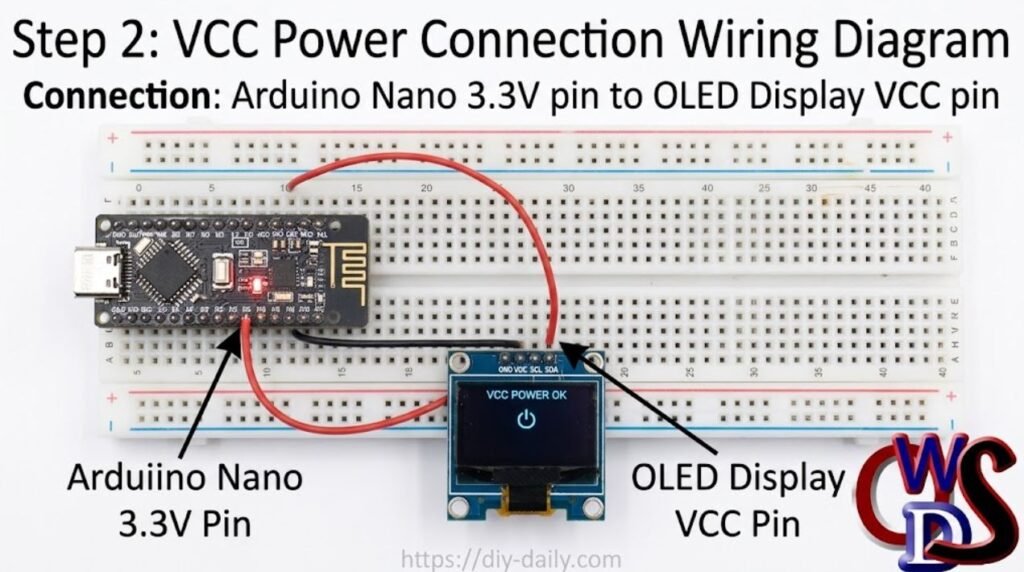
| OLED Display | VCC | 5V | Power Supply |
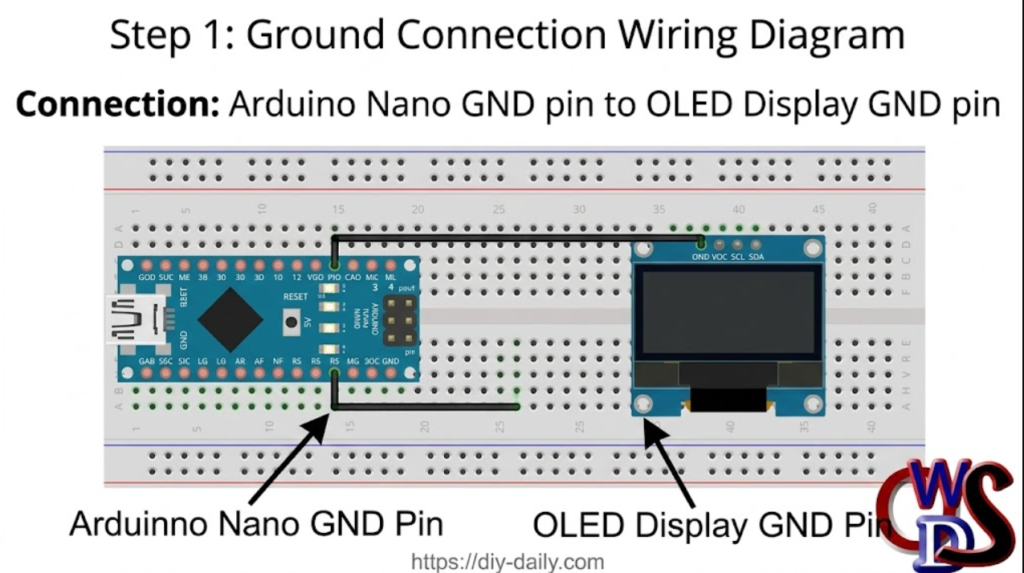
| GND | GND | Ground | |
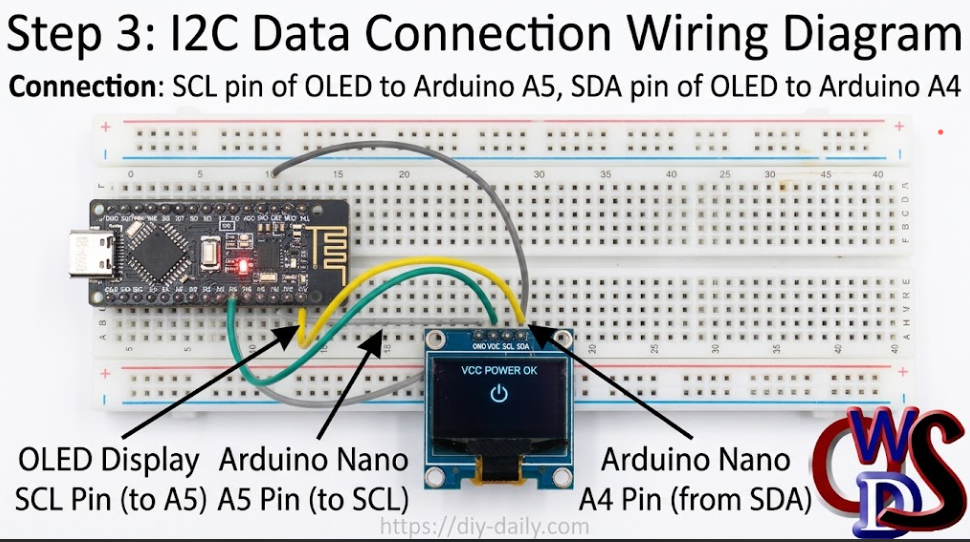
| SCL | A5 (or SCL) | I2C Clock Line | |
| SDA | A4 (or SDA) | I2C Data Line | |
| Start/Stop/Reset Button | Pin 1 | Digital Pin 6 | Control state (Start/Pause) |
| GND | Ground reference | ||
| Reset stopwatch to zero | |||
| Ground reference |
Step by Step Connection Diagram
Step 1
Step 2
Step 3
Step 4
Arduino Source Code
Before uploading the code, ensure you have installed the required libraries via the Arduino IDE Library Manager:
- Adafruit_SSD1306 (by Adafruit)
- Adafruit_GFX_Library (by Adafruit)
Arduino Code
// Ogbugbu Technologies https://ogbugbu-technologies.com.ng/  https://www.youtube.com/@ogbugbu-technologies
// Arduino OLED Stopwatch

#include <SPI.h>
#include <Wire.h>
#include <Adafruit_GFX.h>
#include <Adafruit_SSD1306.h>
#include <Fonts/FreeSans9pt7b.h>
#include <Fonts/FreeSans18pt7b.h>
#include <Fonts/FreeSans12pt7b.h>

#define SCREEN_WIDTH 128 // OLED display width, in pixels
#define SCREEN_HEIGHT 64 // OLED display height, in pixels

// SCL A5
// SDA A4
#define OLED_RESET 0  // GPIO0
Adafruit_SSD1306 display(SCREEN_WIDTH, SCREEN_HEIGHT, &Wire, OLED_RESET);

#define LOGO_HEIGHT   16
#define LOGO_WIDTH    16


const unsigned char PROGMEM icon [] = {
0x00, 0x1F, 0xF8, 0x00, 0x00, 0x1F, 0xF8, 0x00, 0x00, 0x1F, 0xF8, 0x00, 0x00, 0x1F, 0xF8, 0x00,
0x00, 0x1F, 0xF8, 0x00, 0x00, 0x03, 0xC0, 0x00, 0x00, 0x00, 0x00, 0x40, 0x00, 0x00, 0x00, 0xE0,
0x00, 0x1F, 0xF8, 0xF0, 0x00, 0x7F, 0xFE, 0x70, 0x00, 0xFF, 0xFF, 0x20, 0x01, 0xF0, 0x0F, 0x80,
0x03, 0xC1, 0x83, 0xC0, 0x03, 0x81, 0x81, 0xC0, 0x07, 0x01, 0x80, 0xE0, 0x07, 0x01, 0x80, 0xE0,
0x0E, 0x01, 0x80, 0x70, 0x0E, 0x01, 0x80, 0x70, 0x0E, 0x03, 0xC0, 0x70, 0x0E, 0x03, 0xC0, 0x70,
0x0E, 0x03, 0xC0, 0x70, 0x0E, 0x01, 0x80, 0x70, 0x0E, 0x00, 0x00, 0x70, 0x07, 0x00, 0x00, 0xE0,
0x07, 0x00, 0x00, 0xE0, 0x07, 0x80, 0x01, 0xE0, 0x03, 0xC0, 0x03, 0xC0, 0x01, 0xE0, 0x07, 0x80,
0x00, 0xF8, 0x1F, 0x00, 0x00, 0x7F, 0xFE, 0x00, 0x00, 0x1F, 0xF8, 0x00, 0x00, 0x07, 0xE0, 0x00

};

const unsigned char PROGMEM swatch [] = {
0x03, 0xC0, 0x03, 0xC0, 0x03, 0xC0, 0x00, 0x08, 0x07, 0xEC, 0x0E, 0x70, 0x18, 0x18, 0x30, 0x0C,
0x30, 0x8C, 0x21, 0x84, 0x21, 0x84, 0x30, 0x0C, 0x10, 0x08, 0x18, 0x18, 0x0F, 0xF0, 0x03, 0xC0
};


void setup()   {
  pinMode(6,INPUT_PULLUP);  //Switch
  display.begin(SSD1306_SWITCHCAPVCC, 0x3C);  // initialize with the I2C addr 0x3C (for the 64x48)
  display.display();


  display.clearDisplay();
  display.setFont(&FreeSans9pt7b);
  display.drawPixel(10, 10, SSD1306_WHITE);
  display.setTextColor(WHITE);
  display.setCursor(0,0);
  display.print("Viral Science");
    display.display();
    delay(800);
}
int poz=1;
int broj=1;
int kretanjeY=30;

int sec1=0;
int min1=0;
unsigned long msec=0;
unsigned long mili=0;
int pres=0;
int fase=0;
int start=0;
unsigned long tim=0;
void loop()
  {
      display.clearDisplay();
      if(digitalRead(6)==0)
      {
        if(pres==0)
           {
            fase=fase+1;
            pres=1;
            if(fase>2)
            fase=0;
            }

        }else{pres=0;}

     if(fase==0)
      {
        display.setFont(&FreeSans12pt7b);
        display.setFont();
      display.setCursor(50,50);
      display.print("Start");
      display.drawBitmap(48, 8,  icon, 32, 32, WHITE);


      sec1=0;
      min1=0;
      tim=0;
      mili=0;
      msec=0;
      start=0;
      }

      if(fase==1)
      {
        display.clearDisplay();
        display.setFont(&FreeSans12pt7b);
        display.setFont();
        display.setCursor(37,0);
        display.print("Stopwatch");
        display.setFont(&FreeSans9pt7b);

        if(start==0)
          {
            start=1;
            tim=millis();
          }
       msec=(millis()-tim);


        min1=msec/60000;


        if((msec/1000)>59)
           {
            sec1=(msec/1000)-(min1*60);
            }else{
              sec1=msec/1000;
              }

          mili=(msec%1000)/10;

           display.setCursor(42,30);
           if(min1<=9)
           {
            display.print("0");
            display.print(min1);
            }else {display.print(min1);}

            display.print(":");

             if(sec1<=9)
           {
            display.print("0");
            display.print(sec1);
            }else {display.print(sec1);}
            display.setFont(&FreeSans12pt7b);
            display.setCursor(50,57);

                  if(mili<=9)
           {
            display.print("0");
            display.print(mili);
            }else {display.print(mili);}
       }

if(fase==2)
{
     display.clearDisplay();
     display.setFont(&FreeSans12pt7b);
        display.setFont();
        display.setCursor(52,0);
        display.print("Time:");
        display.setFont(&FreeSans9pt7b);
        display.setCursor(42,30);
           if(min1<=9)
           {
            display.print("0");
            display.print(min1);
            }else {display.print(min1);}

            display.print(":");

             if(sec1<=9)
           {
            display.print("0");
            display.print(sec1);
            }else {display.print(sec1);}
            display.setFont(&FreeSans12pt7b);
            display.setCursor(50,57);

                  if(mili<=9)
           {
            display.print("0");
            display.print(mili);
            }else {display.print(mili);}
             display.drawBitmap(105, 20,  swatch, 16, 16, 1);
             display.drawBitmap(12, 20,  swatch, 16, 16, 1);


  }


      display.display();
  }
